
Best Image Enhancer Tools of 2026
These best image enhancer tools help you improve the quality of your image, so you can enjoy your photos with clearer details and better visual quality.
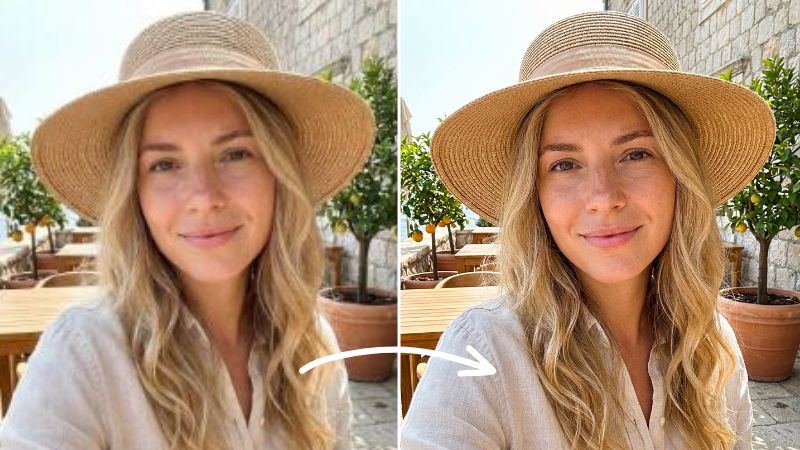
Old photos with faded colors hold the deepest meanings for those who have lived through the times those photos were taken. The details may not be clear, and the colors may not be as vibrant, but the memories and emotions behind them are as spirited as they can be. Fortunately, today, photo enhancement tools can help you relive those moments in the purest state possible by restoring blurry, worn images to something closer to how those moments once felt. And these best image enhancer tools can help you see those pictures again with far more clarity, if not exactly as they were
What are Image Enhancers
Image enhancers are one of the most talked-about tech developments today. Many people are using them to bring old photos back to life. But what do they actually do? These tools improve the overall quality of an image by reducing noise, grain, and blur. Instead of leaving photos dull or washed out, they enhance colors by strengthening what is already there or intelligently restoring tones to create more natural, true-to-life results. These best image enhancer tools of 2026 are great examples of what AI enhancers are capable of and how AI is shifting the photo editing game for creators and everyday users.
Top 6 Image Enhancers You Need in 2026
These top 6 image enhancers will help you revive your picture by regenerating newer and fresher pixels, so you can relive your memories in vibrant colors and clearer emotions.
1. Meitu

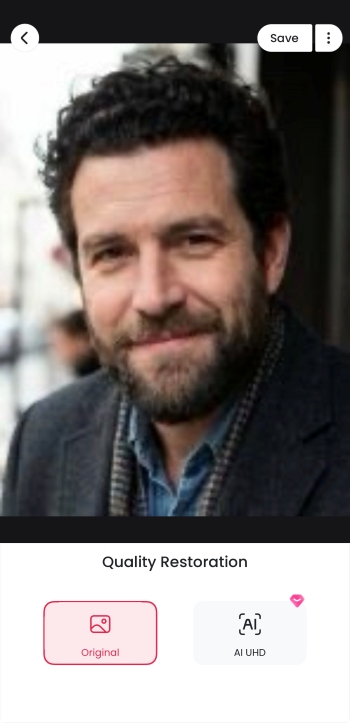
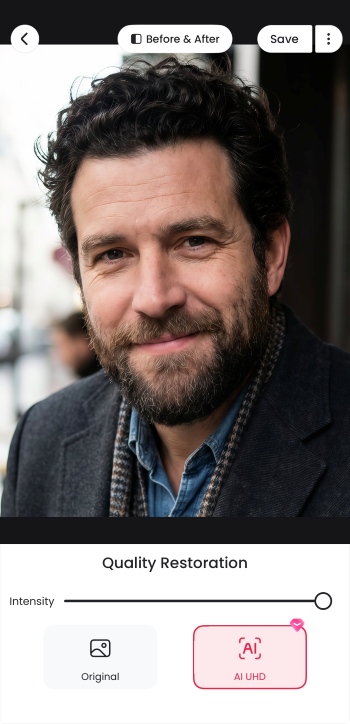
Meitu is a great app overall for anyone looking to get high-end results from a lightweight app with a fully packed feature set. It is easy to use, especially with its one-click enhance option, and it offers a good balance between simplicity and depth.
It is considered the best image enhancer for a reason that it provides two main enhancement modes: general and advanced. The general mode is enough for most users, delivering clean, high-quality results with moderate enhancement that works well in everyday use. The advanced mode, which is a paid feature, offers more detailed and refined enhancement options for those who want greater control and sharper results.
To give an example, the advanced enhancement feels similar to how games render at very high resolution, adding clarity and detail that makes images look more polished. In addition to image enhancement, Meitu also includes features like game-style animation effects, image upscaling, and text enhancement.
Features
- One-tap AI enhance for quick photo improvement
- AI repair in 2k and 4k resolution
- General and advanced enhancement modes
- Noise reduction and blur cleanup
- Color correction and tone balancing
- Portrait-focused optimization
- Image upscaling and text enhancement options
2. Airbrush

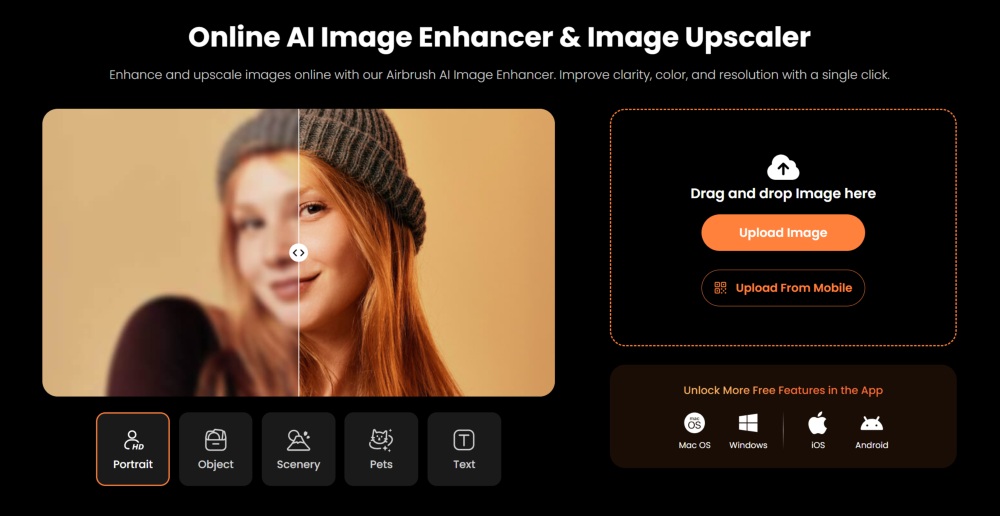
Airbrush Photo enhancer has long been considered an industry standard for photo editing, especially as an easy, one-click solution. Many well-known names across social media have trusted it, so you can expect its enhance feature to deliver reliable results, making its mark as the best image enhancer.
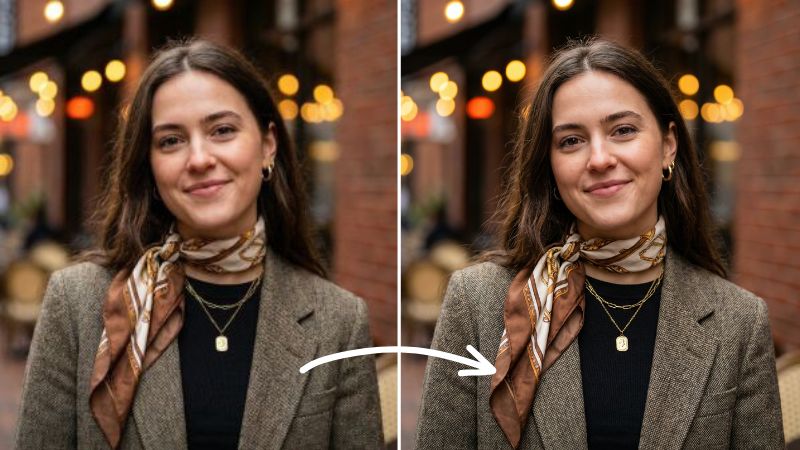
The AirBrush app and web version are both equally efficient when it comes to enhancing images. The web tool combines three features found in the app into one workflow. After uploading your image, you can choose between Ultra HD and AI Ultra HD, then select what you want to enhance, whether it’s a portrait, scenery, object, pet, or text, so the tool understands the purpose of the enhancement. You can also choose the level of refinement with 1×, 2×, or 4× upscaling. Once processed, it applies color enhancement, quality improvement, night view adjustments, and allows you to fine-tune the effect afterward.
Features
- A complete photo correction solution
- Photo Restore for older or worn images
- Remove Glare tool for reflections and light spots
- Adjustable color enhancement and quality improvement
- Night view enhancement for low-light photos
- Manual control after automatic processing
3. Fotor
Fotor is known for taking a slightly different approach compared to other tools on the market. When it comes to image enhancement, you will find this feature listed as an AI upscaler. From there, you can choose between standard and advanced editing options. The standard mode is usually the go-to choice and offers three lighting styles to pick from.
While this approach does help Fotor stand out, the results do not always add much value. If you are looking for more noticeable improvements or stronger color correction, Fotor may not always meet expectations, especially when compared to tools that deliver more dramatic enhancements.
Features
- AI Upscaler used as the main enhance tool
- General and advanced enhancement modes
- Three lighting styles to choose from
- Basic sharpening and clarity improvement
- Simple interface for quick edits
- Works better for light corrections than heavy fixes
4. YouCam Enhancer

YouCam offers both Photo Enhance and AI Repair features, and both do a noticeably good job of improving overall image quality. The process is simple, just one click, and you get a side-by-side comparison, which is something you really need to properly judge the results. Being able to see the before and after makes it easier to evaluate the difference, and in that regard, YouCam delivers clearly and convincingly.
Features
- Photo Enhance and AI Repair tools
- One-click enhancement process
- Side-by-side before and after comparison
- Noticeable clarity and quality improvement
- Easy evaluation of results
- Clean interface focused on quick decisions
5. PhotoCat

PhotoCat Image quality enhancer seems to take a different path compared to most photo editors, mainly because its interface feels quite different at first. But still stands a great chance in becoming the best image enhancer for many. That said, the results are fairly similar to what you would expect from other tools. It does include an AI Enhance feature, but the way you use it takes a little getting used to.
Once you spend some time with it, the interface is not as complex as it initially seems. It allows you to scroll through multiple photos and edit each one individually within the same workspace, which can be useful when working with several images at once.
Features
- AI Enhance feature with batch editing support
- Scroll-based interface for editing multiple images
- Individual adjustments per photo
- Simple enhancement controls once familiar
- Useful for working through large photo sets
- Focus on efficiency rather than deep edits
6. Picsart

PicsArt offers a simple, no-nonsense solution for enhancing photos. Its AI Enhance feature is direct, one click, and incredibly easy to use. You also have control over the intensity, which helps keep results accurate rather than overprocessed.
For anyone who just needs to reduce a bit of blurriness and graininess, PicsArt delivers solid and reliable results without adding unnecessary complexity.
Features
- One-click AI Enhance feature
- Adjustable intensity control
- Noise and grain reduction
- Minor blur correction
- Simple workflow for quick edits
- Suitable for casual photo cleanup
Bottom Line
All of these best image enhancer tools perform well and are great choices as top choices for AI image enhancement, with powerful engines backing them up. Among them, Meitu is a great choice to consider for its versatility, while Airbrush impresses with its ultra-HD quality enhancement, showing just how strong its AI engine is.